Maintenance
Replacing Consumables
Consumables recommended by our company are manufactured under the standards suitable for this machine. Using consumables not recommended by our company may affect print quality or performance provided by the product. Use consumables that our company recommends for this machine.
The following consumables are available as replacements.
|
For the replacement method, refer to the steps provided on the consumable box. |
|
For the replacement method, refer to the steps provided on the consumable box or bundled instruction sheet. |
|
For the replacement method, refer to the instruction sheet provided with the consumable box. |
|
These are the replacement parts for the optional finisher unit. For the replacement method, refer to the steps provided on the box of the consumable. |
Note
When replacing Toner Cartridges, keep the machine power switched on.
When replacing a toner cartridge or Waste Toner Container, toner may spill and soil the floor. We recommend laying a piece of paper or a sheet on the floor beforehand.
Do not take out or shake the Waste Toner Container before it is filled up. Accurate detection can become no longer possible, and the toner may be spilled from the Waste Toner Container.
Do not touch the filter surface at the leading end of Waste Toner Container. You can get toner on your fingers.
A trouble with image quality results if the Drum Cartridge is placed under a direct sunlight or intense fluorescent light, or if the drum surface is touched and scratched.
Use up the staples before replacing.
Handling consumables
|
|
|---|---|

|
Store all consumables in accordance with the instructions given on its package or container. |
|
|
Never use a vacuum cleaner for spilled toner and residual toner in this product, toner cartridge or waste toner container. It will catch fire by electric sparks inside a vacuum cleaner and cause explosion. Use a broom or a wet cloth to wipe off the spills. If you spill a large volume of toner, contact your local representative. |

|
Never throw a toner cartridge into an open flame. Remaining toner in the cartridge will catch fire and cause burn injuries or explosion. If you have a used toner cartridge no longer needed, contact your local representative for its disposal. |
|
|
Never throw a waste toner container into an open flame. Toner may catch fire and cause burn injuries or explosion. If you have a used waste toner container no longer needed, contact your local representative for its disposal. |
 WARNING
|
|
|---|---|
|
|
Keep drum cartridges and toner cartridges out of the reach of children. If a child accidentally swallows toner, spit it out, rinse mouth with water, drink water and consult a physician immediately. |
|
|
When replacing drum cartridge and toner cartridge, be careful not to spill the toner. In case of any toner spills, avoid contact with clothes, skin, eyes and mouth as well as inhalation. |
|
|
|
Do not store boxes of consumables upright.
Do not unpack consumables before use. Avoid storing consumables in the following locations:
In high temperature and humid locations
Near heat-generating devices
Areas exposed to direct sunlight
Dusty areas
Do not store boxes of consumables upright.
When using consumables, carefully read precautions for use instructed on their bodies or packages.
We recommend keeping spare consumables in stock.
To order consumables, have the product codes ready and contact your local representative.
Confirming Consumables Status
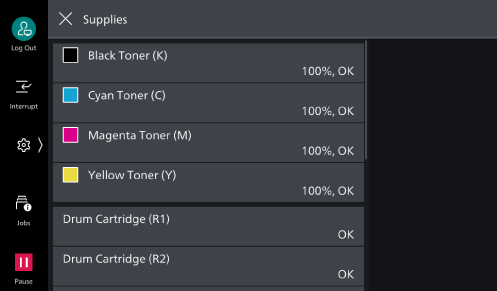
To display the consumables status, tap  > [Device Status] > [Supplies].
Note
When the time for replacing a consumable part approaches, a message appears on the touch panel display. Replace the consumable indicated in the message.
How to Install the Finisher A3 Front Door
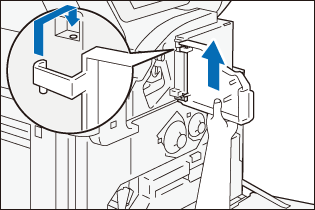
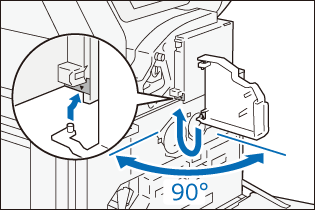
If the front door of Finisher A3 separates during operations such as replacing the staple cartridge, reinstall the cover using the procedure below:
- Insert the axis of the lower part of the front door into the hole of the finisher main unit by checking the position mark on the label.
Note
Place the front door so that it meets the finisher main unit at a right angle.
- While lifting the front door, insert the upper part axis into the hole of the finisher main unit.