
Image Quality Trouble
Output is too light (faded or unclear) |
|---|

|
The paper is not appropriate for the machine. Confirm the paper tray setting and load appropriate paper. |
The paper is damp. Replace the paper. |
Change the paper type setting and try printing again. |
No toner may be left in the toner cartridge. Confirm the remaining toner quantity, and replace the toner cartridge with a new one. |
Execute [Calibration] when printing or copying from the printer driver. Refer
|
A drum cartridge or the fusing unit is damaged or has deteriorated. Depending on its condition, the drum cartridge or fusing unit may need replacement. Contact your local representative. |
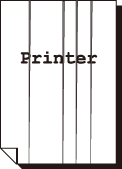
Black spots, black lines or color lines appear on output. Equally spaced smears appear on output. |
||
|---|---|---|

|
|

|
The paper path may not be clean. Print a couple of sheets or so. |
||
A drum cartridge or the fusing unit is damaged or has deteriorated. Depending on its condition, the drum cartridge or fusing unit may need replacement. Contact your local representative. |
||
Printing can be rubbed off with your finger. Toner is not fused to the paper. Output is smudged with toner. |
|---|

|
The paper type of the selected paper tray is not appropriate. Change the paper type setting and try printing again. |
Some special types of paper cannot be fused. Replace with the appropriate paper. |
The paper is damp. Replace the paper. |
The fusing unit is damaged or has deteriorated. Depending on its condition, the fusing unit may need replacement. Contact your local representative. |
The whole page is printed black. |
|---|

|
A drum cartridge is damaged or has deteriorated. Depending on its condition, the drum cartridge may need replacement. Contact your local representative. |
There may be something wrong with the high-voltage power supply. Contact your local representative. |
Output is blank. |
|---|

|
Multiple sheets were fed at once. Fan the paper well and reload it in the tray. |
A drum cartridge is damaged or has deteriorated. Depending on its condition, the drum cartridge may need replacement. Contact your local representative. |
There may be something wrong with the high-voltage power supply. Contact your local representative. |
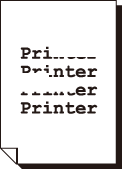
Output is partially blanked-out. White streaks or color streaks appear on output. |
|---|
|
The paper is not appropriate for the machine. Load appropriate paper. |
The paper is damp. Replace the paper. |
The LED printheads inside the machine may be dirty. Clean the LED printheads. |
No toner may be left in the toner cartridge. Confirm the remaining toner quantity, and replace the toner cartridge with a new one. |
A drum cartridge is not installed correctly. Install the drum cartridge correctly. |
A drum cartridge or the fusing unit is damaged or has deteriorated. Depending on its condition, the drum cartridge or fusing unit may need replacement. Contact your local representative. |
White patches appear on output. Images are partially blanked-out. Toner is scattered around images. Images are bluish. |
|---|

|
Change the paper type setting and try printing again. |
Adjust the image transfer in If toner is scattered, raise the image transfer vale. |
 > [Device] > [Maintenance] > [Image Quality] > [Adjust Image Transfer] > [Enter Sample Number and Adjust]. If white patches appear, or output or images are partially blanked-out, lower the image transfer vale.
Text is smeared. |
|---|

|
The paper is not appropriate for the machine. Load appropriate paper. |
The paper is damp. Replace the paper. |
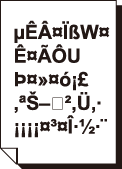
Text is garbled. Printed output is not the same as the original data displayed on the screen. |
|---|
|
The machine is set to substitute TrueType fonts with the printer fonts. Set the printing method of TrueType fonts to [Always Use TrueType Fonts] under [Specify Font] on the [Advanced] tab of your printer driver. |
Images are skewed. |
|---|

|
The paper guides are not adjusted to the correct positions. Adjust the paper guides to the correct positions. |
The color tone is strange. |
|---|
Execute [Calibration] when printing or copying from the printer driver. Refer
|
Print quality on postcards or envelopes is poor. |
|---|
Unsupported postcards or envelopes are loaded in the machine. Load appropriate paper. |
Check whether the paper type setting on the printer driver properties screen or Control Panel is configured correctly. |