
How to Use the Control Panel
Features in the Control Panel
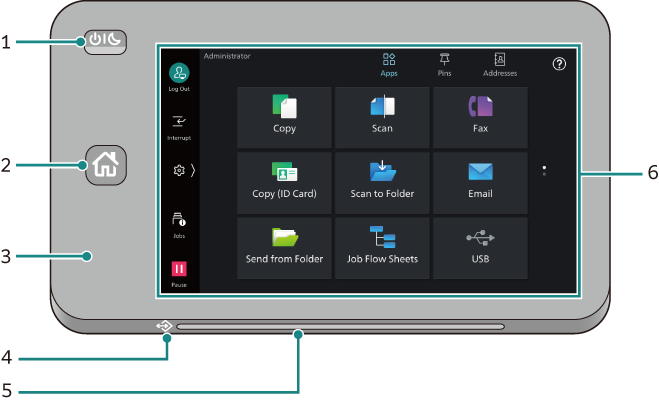
1. <Power/Power Saver > Button
Switches the machine power or Power Saver mode on/off.
During the Power Saver mode, the white LED surrounding the button blinks slowly.
Note
While “Please wait…” is displayed, the machine is warming up. You cannot use the machine during this time.
If the machine does not power on, check that the power cable is plugged in.
2. <Home> Button
Press this button to display the Home screen.
3. NFC Touch Area
Hold your NFC-enabled mobile device near this area. The NFC feature must be enabled on the machine to communicate with each other.
4. Data Indicator
Blinks while the machine is sending or receiving data to or from a client computer.
This indicator lights up when data is stored in the machine memory, or when faxes sent to folders are stored in those folders.
5. Status Indicator
Lights or blinks in green to indicate the machine status such as when a job has been finished.
Blinks in orange when the paper runs out or when an error occurs.
6. Touch Panel Display
Used to utilize different features of the machine or change the settings.