
Introduction
This manual describes setup process, basic operations, maintenance, and convenient usages of the machine.
Please note that this guide uses screen images that show all optional units and optional products equipped to describe operations.
Refer
Refer to “Reference Guide” for the various features that can be performed on the touch panel display.
|
As the copying device contains a feature designed to prevent forging of certain documents, there may be rare instances where copies or scanned images do not achieve the desired results.
If a malfunction occurs with the machine's storage media, any received or stored data including registered configurations may be lost. Our company is not responsible for any direct or indirect damages arising from or caused by such data loss.
Our company is not responsible for any breakdown of machines due to infection of computer virus or computer hacking.
Before sending a Fax, check to make sure the recipients are the correct, intended recipients.
The printed image may fade or peel off due to moisture caused by water, rain or vapor. For details, contact your local representative.
In this manual, safety instructions are preceded by the symbol
 . Always read and follow the instructions before performing the required procedures.
March 2026 GM1954E2-4 Edition 1 |
Notations in Manual
The following notations and symbols are used in this manual, depending on the content being explained.
Important |
Indicates important information you have to know or be reminded before operations. |
Note |
Indicates supplemental information useful for operations. |
Refer |
Indicates reference destinations. |
“ ” |
|
< > |
Keys of the keyboard, buttons and lamps of the optional units. |
[ ] |
|
> |
The display order on the control panel. It is used as [Item name] > [Item name]. |
Description in this manual such as print speed and feed capacity assumes 80 g/m2 paper.
"Long paper" indicates paper whose is 488.1 mm landscape or larger.
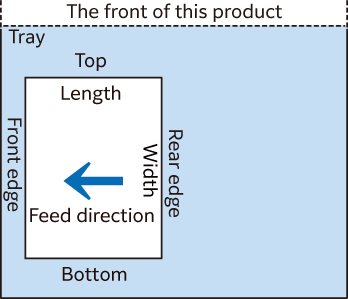
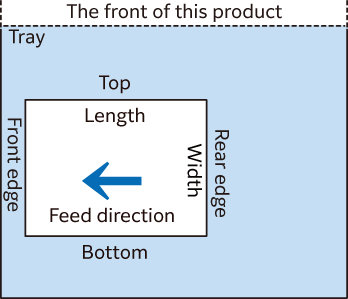
In this manual, the loading orientations of paper and originals are represented as follows:
 , “Portrait”: loading paper or originals in portrait orientation when viewed from the front of the machine.
 , “Landscape”: loading paper or originals in landscape orientation when viewed from the front of the machine.
Portrait
The short edge is referred to as “Length” and the long edge is “Width”.
Landscape
The short edge is referred to as “Width” and the long edge is “Length”.
Some functions mentioned in this manual may not be used according to the model and installed optional units.
“WSD” stands for “Web Services on Devices”.
“XPS” stands for “XML Paper Specification”.