
Feature List Screen of Apps
Here is the description using the feature list of Copy app as an example.
Note
The displayed items may differ depending on the permission settings of login user or the settings under
 > [Device] > [System Settings] > [Screen/
Button Settings ].
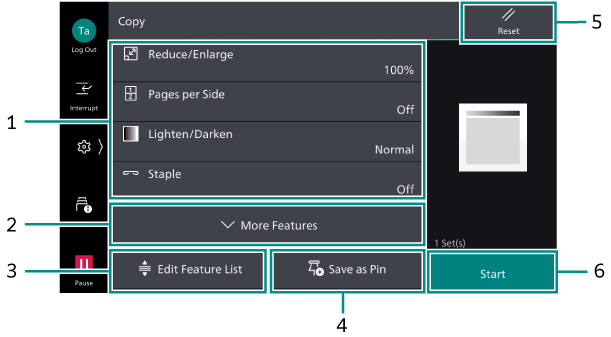
1. Feature List
The frequently used features are listed here.
Tap each feature to modify settings.
2. [More Features]
Displays the features that are not listed on the feature list.
3. [Edit Feature List]
Edit what features are displayed on the feature list.
Refer
Refer to [Edit Feature List] under Customizing the Apps Screen for how to edit.
4. [Save as Pin]
Saves the current settings combination as a pin to [Pins] on the Home screen.
5. [Reset]
Restores all the settings you have changed.
6. [Start]
Starts a job.