
Loading Originals
Document Feeder
Loadable Originals
B1-C |
B5-PC/B4-PC |
||
|---|---|---|---|
Paper size |
Width |
125 to 297 mm |
49 to 297 mm |
Length |
1 sided: 85 to 432 mm 2 sided: 125 to 432 mm |
85 to 432 mm |
|
Paper Weight |
Single side printing |
38 to 128 g/m2 |
38 to 128 g/m2 |
2 sided |
50 to 128 g/m2 |
38 to 128 g/m2 |
|
Maximum number of sheets (80 g/m2 paper) |
110 sheets |
130 sheets |
|
Note
When using the fax function, loadable length extends to 600 mm.
When B5-PC or B4-PC is installed, the business card size originals can be loaded; the supported size is up to 55 mm for the width, 91 mm for the length, and up to 209 g/m2 of paper weight.
Loading Procedure
Before loading the originals into the document feeder, ensure that they are:
Free of sticky notes, adhesive tape, staples, and clips.
Not containing moisture correction fluid.
Without strong wrinkles or creases.
- Open the document cover.
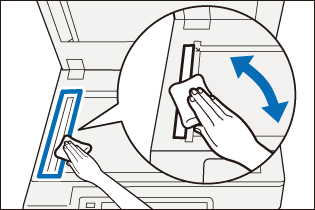
- Wipe off any dirt adhering to the constant velocity transport glass and the film located on the left side of the document glass.
- Close the document cover.
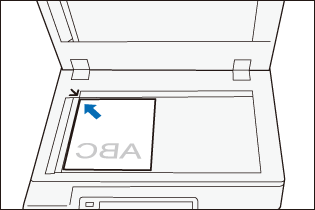
- Align the upper left corner of the original so that its size is correctly detected.
- Load the original into the center of the document feeder with its side to be read (side 1 for 2-sided original) face up.
Important
Do not load originals exceeding the maximum fill line. It might cause paper jams or machine malfunctions.
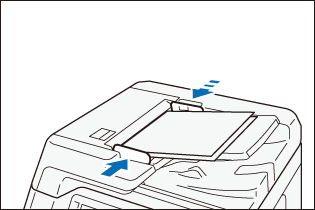
- Move the document guide to align with both edges of the original.
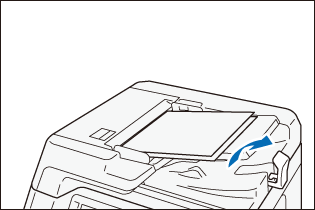
- Open the document stopper.
Document Glass
Loadable Originals
Paper size |
Width |
Up to 297 mm |
Length |
Up to 432 mm |
Loading Procedure
- Open the document cover, and wipe off any dirt from the document glass.
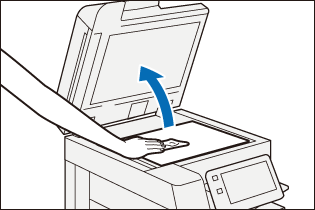
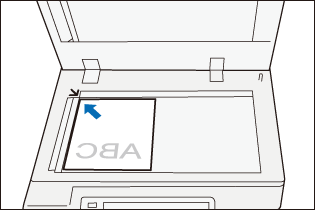
- Place the original document facing down on the document glass and align it to the top left corner of the document glass.
- Close the document cover.