
How to Turn off the Machine
If you turn the machine off, all functions of the machine stop.
Important
Do not turn off the machine in the following situations. Otherwise, data being processed may be erased.
While data is being received (the Data LED is lighting)
Within five seconds after outputs have been delivered
During copying or scanning
- With the machine turned on, press <Power/
Power Saver > on the control panel.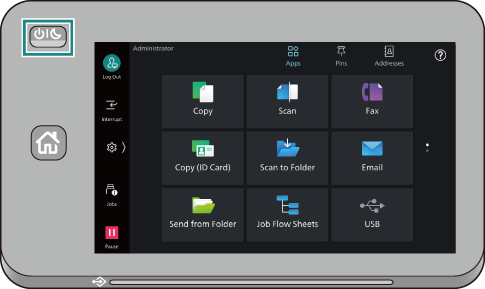
Note
The machine turns off also by pressing and holding the <Power/
Power Saver > button.
- Tap on [Power Off Device].
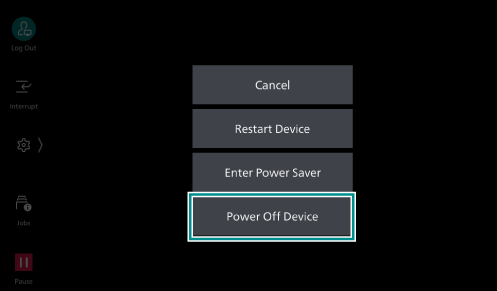
Note
When you tap on [Enter Power Saver], the machine enters Power Saver mode.
After turning the machine off, if you turn it on again before the operation screen display has gone out, the machine does not start. If you want to turn the machine on again, check the operation screen display has gone out, wait for some time, and then power the machine back on.
When you press the <Power/
Power Saver > button while in Power Saver Mode, the machine exits Power Saver.