Manually Transferring Files to netprint/Public Print/a Public Printer
- These settings are displayed when settings for offsite printing with netprint have been configured in Configuring Settings for Offsite Printing with netprint, Public Print, or a Public Printer.
- Log in to FUJIFILM IWpro with the account of a private user.
- For information on logging in, see Logging In in "Getting Started with FUJIFILM IWpro".
- In the launcher menu, click [Print].
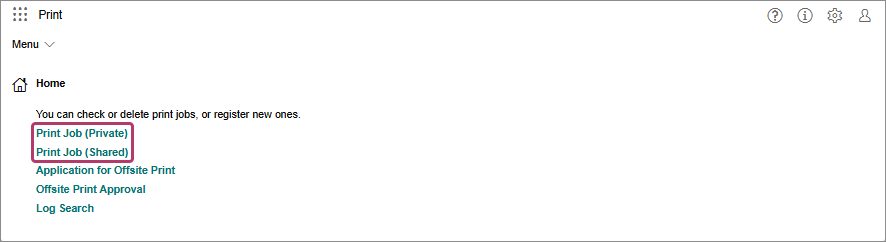
- In the [Print] menu, click [Print Job (Private)] or [Print Job (Shared)] in [Home].
- On the [Print Job (Private)] screen or [Print Job (Shared)] screen, click [
 ] for the file to transfer.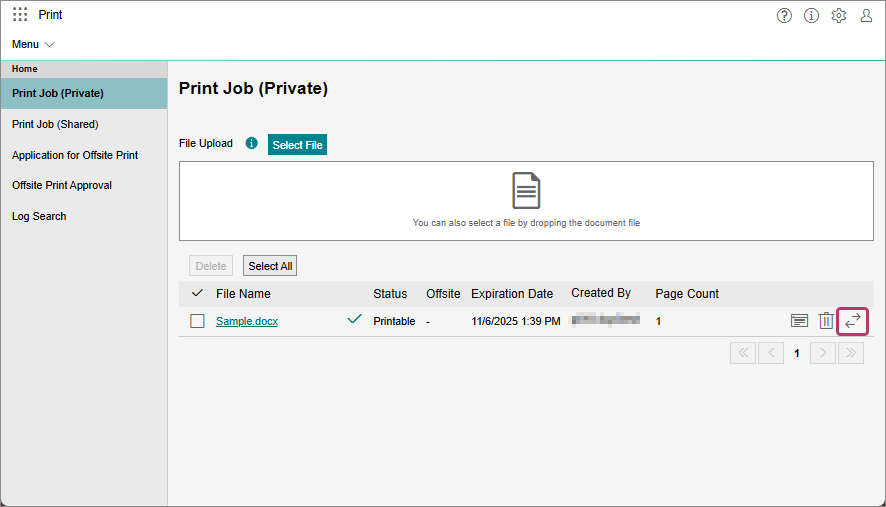
- Perform the following operations.When Transferring Files to netprint
- These settings are displayed when settings for offsite printing with netprint have been configured. For details, see Configuring Settings for Offsite Printing with netprint, Public Print, or a Public Printer.
- On the [Offsite Print] screen, enable [Send to netprint].
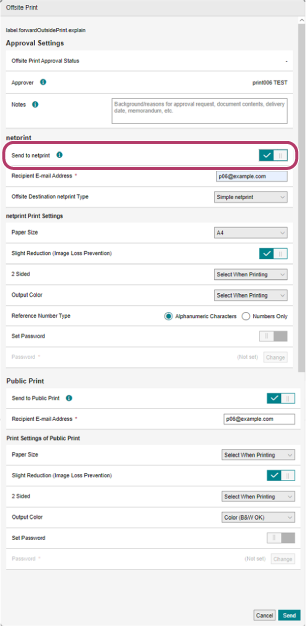
- Configure the various items as required.
- Click [Send].
- If you specified a netprint user account, a message confirming whether you want to save the user ID and password is displayed.
When Transferring Files to Public Print- These settings are displayed when settings for offsite printing with Public Print have been configured. For details, see Configuring Settings for Offsite Printing with netprint, Public Print, or a Public Printer.
- On the [Offsite Print] screen, enable [Send to Public Print].
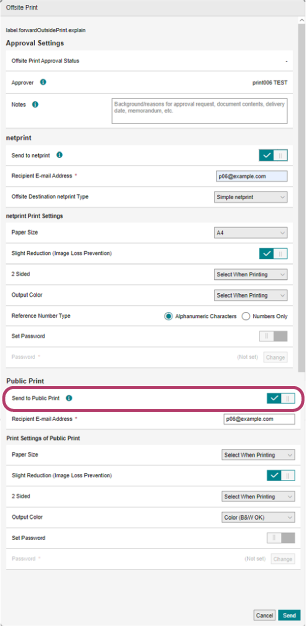
- Configure the various items as required.
- Click [Send].
When Transferring Files to a Public Printer- These settings are displayed when settings for offsite printing to a public printer have been configured. For details, see Configuring Settings for Offsite Printing with netprint, Public Print, or a Public Printer.
- On the [Offsite Print] screen, enable [Offsite Print to Public Printer].
- Click [Send].