Checking/Configuring the Plug-in Status
You can check the operation status of LDAP synchronization and the daily notification function of the plug-in.
- Configure these settings as required when devices use the Device Management function. Whether devices will use the Device Management function is set during the device registration procedure.
- For information on registering a device to FUJIFILM IWpro, see Registering a New Device.
- Log in to Internet Services with the account of the system administrator.
- For information on logging in to Internet Services, see Logging In to Internet Services.
- Perform the following operations.
- Select [System] > [Plug-in Settings].
- Select [FUJIFILM IWpro Device Plugin], and click [View].
- Perform the following operations.When Checking the Plug-in Status
- On the [Plugin Information] screen, check the status of the plug-in.
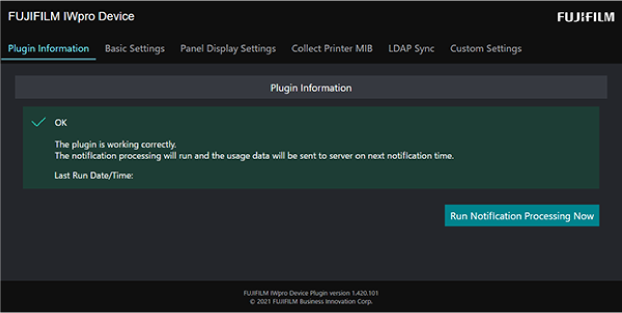
- To send the log data at that point to Device Management, click [Run Notification Processing Now].
When Changing Common Settings- Click [Basic Settings], and configure each item on the [Basic Settings] screen.
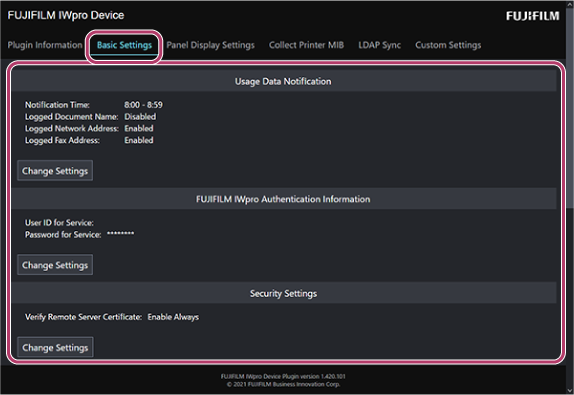
- You can change the time for daily notification and the authentication information of the system administrator and Device Management.
When Checking the Printer MIB Notification Status- On the [Collect Printer MIB] screen displayed by clicking [Collect Printer MIB], check the notification status of the Printer MIB data.
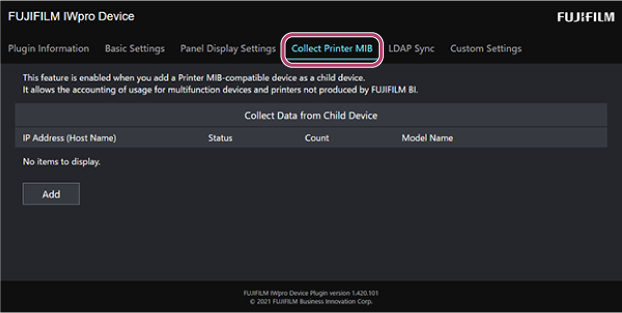
- To send the Printer MIB data at that point to Device Management, click [Run Notification Processing Now].
When Checking the LDAP Sync Status- On the [LDAP Sync] screen displayed by clicking [Collect Printer MIB], check the LDAP sync status.
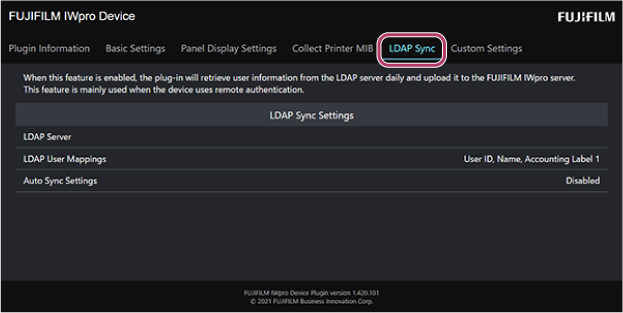
- To execute the LDAP sync process, click [Run Notification Processing Now].
- On the [Plugin Information] screen, check the status of the plug-in.