[Basic Settings] Screen
This screen is displayed by clicking the [Basic Settings] tab after starting Internet Services on the device where the plug-in is installed.
- This operation is performed by the system administrator.
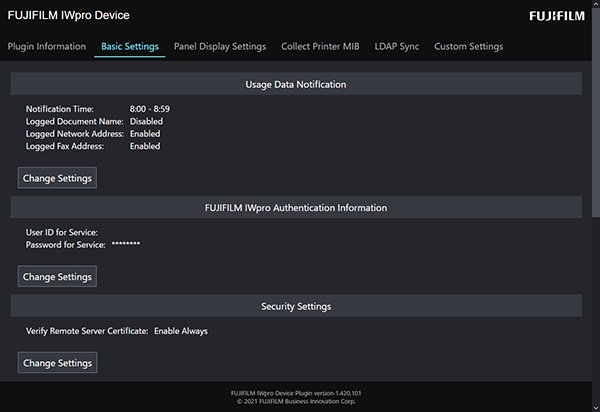
[Usage Data Notification]
Click [Change Settings], and configure the following items.
[Notification Time]
Configure the time that the device notifies Device Management of the usage data.
[Logged Document Name]
Selects whether to notify Device Management of the document name for the print or direct fax function.
The document name is used for recording the job log file and accounting by document type.
Deselect this check box if you do not want to send this data for security reasons.
[Logged Network Address]
Selects whether to notify Device Management of the address of the PC and server.
The network address is used for recording the job log file.
Deselect this check box if you do not want to send this data for security reasons.
[Logged Fax Address]
Selects whether to notify Device Management of the fax number and destination name.
The fax destination is used for recording the job log file and telephone charge accounting by Job Log Analyzer.
Deselect this check box if you do not want to send this data for security reasons.
[FUJIFILM IWpro Authentication Information]
Click [Change Settings], and configure the following items.
[User ID for Service], [Password for Service]
Enter the user ID for the service and the password for the service.
[Security Settings]
Click [Change Settings], and configure the following items.
[Verify Remote Server Certificate]
This setting is for protecting the communication between this plug-in and Device Management.
[Always On]
The communication between this plug-in and Device Management is protected regardless of the device settings. This setting is enabled when [FUJIFILM IWpro Device Setup] is selected in [Security Settings] during installation.
[Follow Machine Settings]
Switches whether to protect the communication according to the [Verify Remote Server Certificate] setting in [SSL/TLS Settings] on the device. This setting is enabled when [Do Not Change] is selected in [Security Settings] during installation.