[File Name] Screen
This screen is displayed by tapping either of the following.
- [File Name] in [Box] > [Features] on the [Scan to Save Location] screen
- [File Name] in [Google Drive] > [Features] on the [Scan to Save Location] screen
- [File Name] in [kintone] > app selection > record selection > [Scan File Destination] > [Features] on the [Scan to Save Location] screen
- [File Name] in [Microsoft Teams] > team selection > channel selection > [Features] on the [Scan to Save Location] screen
- [File Name] in [OneDrive for Business] > [Features] on the [Scan to Save Location] screen
This screen enables you to configure the file name when scanning and importing documents.
- The displayed items differ according to the license you have a contract for.
- If you register a CSV file containing candidate strings for file names in a Web browser and enable [Use user-defined string in the file name] on the [Admin Menu] screen, the candidate strings are displayed on the [File Name] screen.
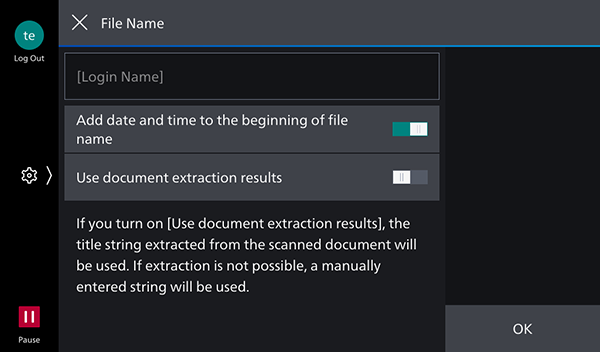
Text Box
Tap this to display the keyboard entry screen.
[Add date and time to the beginning of file name]
Enable this to add a date and time to the start of the file name.
Example: If a date and time are added to the start of a file named "InvoiceA"
20241216140231_InvoiceA
[Use document extraction results]
Enable this to use the string of the title extracted from the scanned document as the file name.