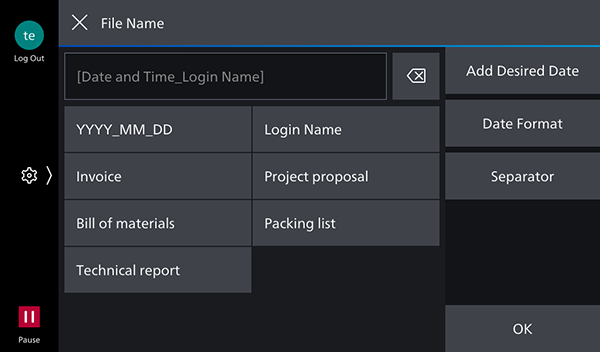
[File Name] Screen (when Candidate Strings for File Names Are Registered)
This screen enables you to configure the file name used when scanning and importing documents.
You can select custom strings registered as candidates for file names.
To use this function, it is necessary to register a CSV file containing candidate strings for file names and enable [Use Custom for File Names] on the [Admin Menu] screen.
- With a Print license, the function for displaying suggested file names when scanning cannot be used.
- For information on registering CSV data, see Registering Candidate Strings for File Names.
[ ]
]
Closes the screen without reflecting the configured string scan settings.
Text Box
Tap this to display the keyboard entry screen.
[Add Desired Date]
Displays a calendar for selecting the date.
[Date Format]
Sets the format of the date to add to [Date and Time_Login Name].
[Separator]
Enables you to select hyphen (-), underscore (_), or dot (.) as the separator character between strings.
- Back slashes (\), slashes (/), colons (:), question marks (?), asterisks (*), double quotation marks ("), angle brackets (< and >), and pipes (|) cannot be entered.
- Periods (.) cannot be used at the end of a string.
- Single-byte spaces cannot be used at the end of a string.
- When setting to add the login name to the end of the file name, the "Given Name" information registered in FUJIFILM BI Direct will be the end of the file name.
If the end of the "Given Name" contains a period (.) or a half-width space, or if the "Given Name" is blank, the period (.) or half-width space will be removed from the end of the file name.