Screen Indicating That Sending Is Complete
This screen is displayed by clicking [Send] on the [Basic] screen or [File Attributes] screen.
It enables you to check information such as the expiration date and print reference number when the upload process has been successfully completed.
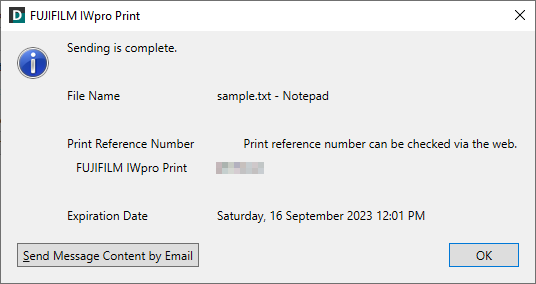
[Send Message Content by Email]
Launches e-mail software and displays a screen for editing a message with the upload results and print reference number entered. The address set in [Notification Email Address When Sending is Complete] on the [File Attributes] screen is entered as the destination.
[Check Print Job]
Enables you to download and check the uploaded file.
- [Check Print Job] is displayed when using FUJIFILM IWpro Print Tool for netprint/Public Print.