[File Attributes] Screen
This screen is displayed by selecting the Print Tool and printing.
It enables you to configure settings such as the disclosure range of the file and print reference number when uploading files to FUJIFILM IWpro Print.
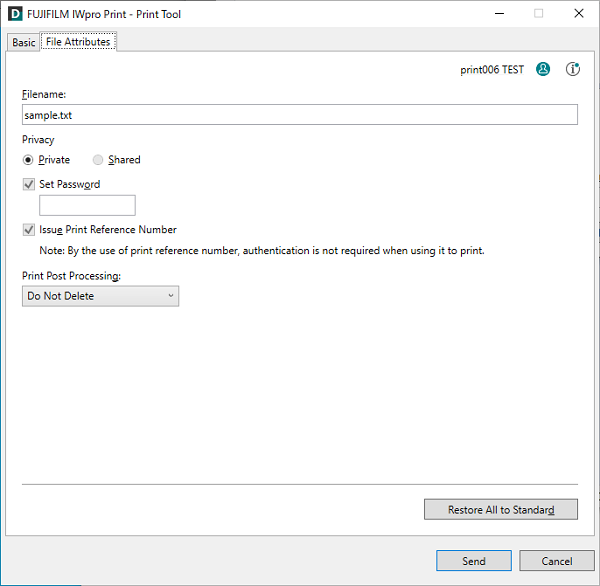
[File Name]
Configures the file name.
[Privacy]
Configures the disclosure range for the file.
Select [Privacy] or [Shared].
[Set Password]
Select this check box to set a password for the file. Enter the four digit password using single-byte numbers.
[Issue Print Reference Number]
Select this check box to issue a print reference number when uploading the file.
- If an administrator has enabled [Allow Issuing of Print Reference Number], print reference numbers can be issued.
[Print Post Processing]
Configures the process to perform after printing.
[Restore All to Standard]
Restores all the default settings.
[Send]
Starts uploading the file.