Uploading a File to OneDrive for Business
- Tap [FUJIFILM IWpro Capture] on the home screen of the device.
- Log in.
- For information on logging in, see Logging In in "Getting Started with FUJIFILM IWpro".
- On the rule selection screen, tap [Scan to Save Location].
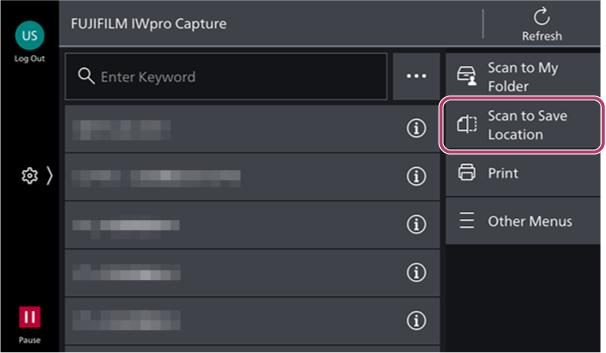
- If you have a contract for a print license, tap [Scan] on the scan/print selection screen.
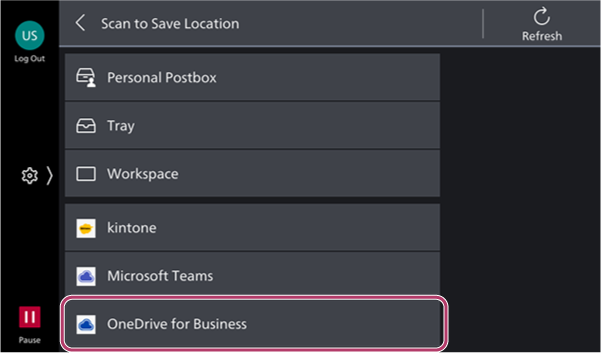
- On the [Scan to Save Location] screen, tap [OneDrive for Business].
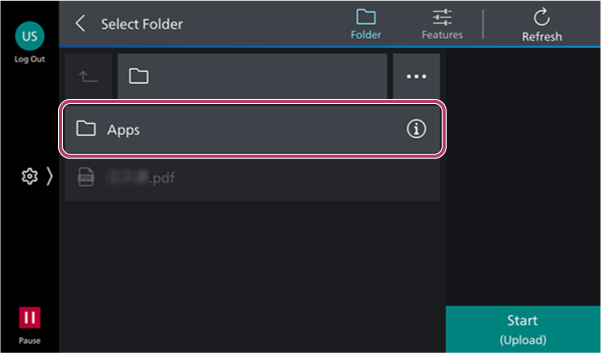
- On the [Select Folder] screen, select the storage destination of the document to scan.
- To change the scan settings, tap [
 ].
].
- To change the scan settings, tap [
- Tap [Start].