Print Settings Screen
This screen is displayed by selecting [FUJIFILM IWpro Print] from [Destination] on the print preview screen of a Chromebook and clicking [Print].
It enables you to configure basic print settings such as the output color and 2 sided mode.
- The number of displayed items differs according to the user type and whether approval is required.
- New notifications are displayed in a popup.
- If you are not authenticated, log in to FUJIFILM IWpro. For information on logging in, see Logging In to a Tool or Mobile App in "Getting Started with FUJIFILM IWpro".
[Basic] Tab
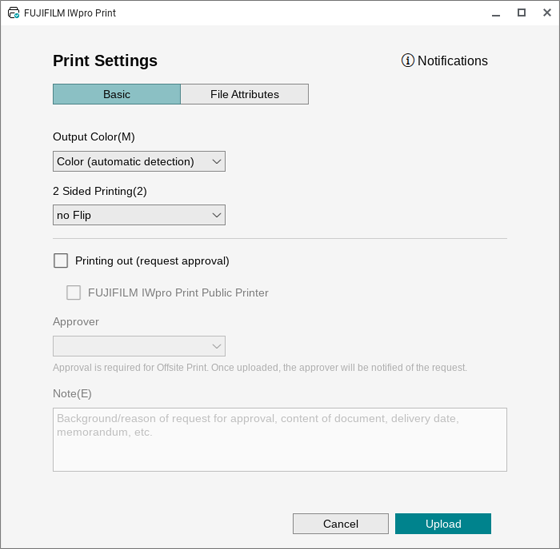
[Output Color]
Configures the color mode for printing.
[2 Sided Printing]
Sets the 1 sided or 2 sided mode for printing.
[Printing out (request approval)]
Configure this to print from a public printer or print from netprint.
- This is only displayed if the tenant supports offsite printing.
- If the print settings of a print job are restricted in the [Group Policy] setting of netprint for business, the job cannot be forwarded from FUJIFILM IWpro Print to netprint. To forward the job to netprint for business, ask the netprint administrator to check for restrictions in the [Group Policy: File Related] setting.
[FUJIFILM IWpro Print Public Printer]
Printing can be performed on a public printer.
[Print with netprint]
Enables printing with netprint.
[netprint Password]
Enter the password corresponding to the netprint ID.
[Remember]
Enable this to remember the password for next time.
[netprint Notification Email Address]
Enter the notification e-mail address for netprint. This is displayed for shared users.
[Approver]
Selects the approver for offsite printing (primary approver or proxy approver).
- This is only displayed if the approval print function is supported.
[Note]
Enter a comment for requesting approval.
- This is only displayed if the approval print function is supported.
[File Attributes] Tab
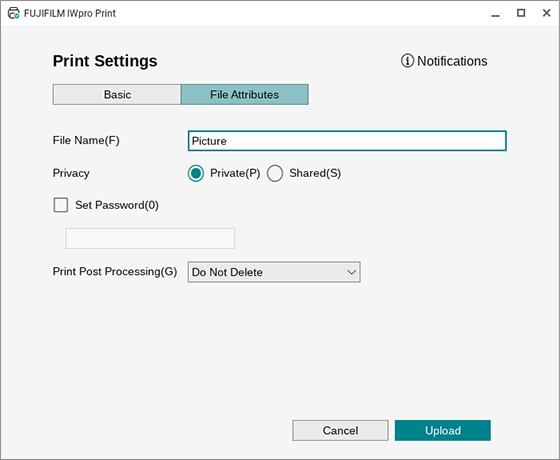
[File Name]
Enter the file name to use when sending the file to the server.
[Privacy]
Configures the disclosure range for the file to print.
[Set Password]
Select this check box to enter the password.
- This item is not displayed if [Password required when issuing print reference number] is enabled on the [Basic Settings] screen.
[Issue Print Reference Number]
Select this check box to issue a print reference number when file sending is successful.
- This is only displayed if the target tenant to send to supports the issuing of print reference numbers.
[Print Post Processing]
Configures the process to perform after downloading the file after printing.
[Upload]
Performs sending. When sending is complete, close this screen.
- This button is only valid when [netprint Password], [File Name], and [Password] are entered.
Common Items
Login User ID
Displays the user ID of the login user.
Click it to display [User ID], [Tenant Name], [Tenant ID], and [Notifications].
Click [Notifications] to display notifications from FUJIFILM IWpro Print and netprint.