[List of Unregistered Users] Screen
This screen is displayed by clicking [List of Unregistered Users] in [User Management] in the [Device Management] menu.
It displays a list of users that are not registered in Device Management but who have information sent from a device. Registers the selected user to Device Management.
- When several thousand unregistered users exist, some of the unregistered users may not be displayed. If the target users are not displayed, click [Add] or [CSV Upload] on the [List of Registered Users] screen to add the users.
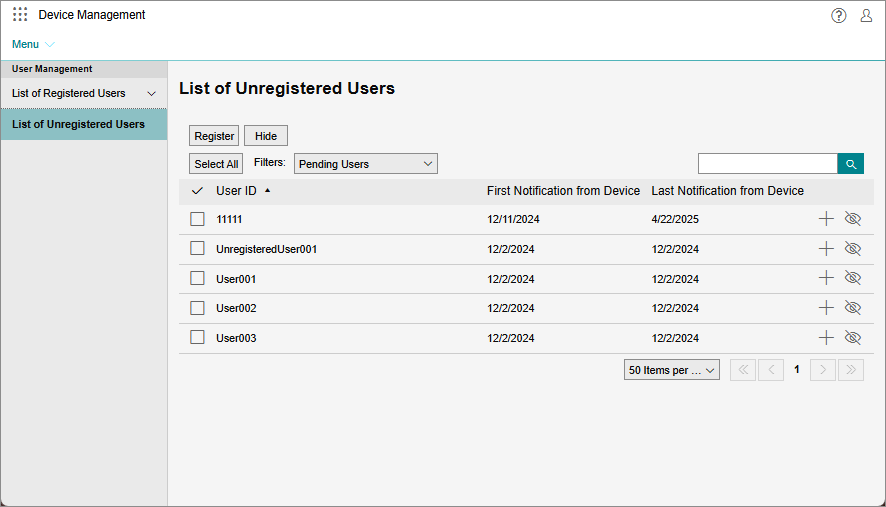
[Register]
Registers the selected user to Device Management.
If one user is selected, the [Register Unregistered User] screen is displayed.
If multiple users are selected, you can configure [Accounting Label 1 - 3] on the [Batch-Register Unregistered Users] screen to register them.
[Hide]
Hides the selected user from the list. Use this to separate users from those that need to be registered.
The hidden users can be displayed by clicking [ ] and selecting [Hidden Users].
[Reset to Pending]
Displays the hidden users in the list again. This is available when [] is clicked and [Hidden Users] is selected.
[Pending Users]
Enables you to select [Pending Users] or [Hidden Users] as the users to display in the list.
[ ]
]
Enables you to enter arbitrary text in the search box to search for users to display in the list.
List of Unregistered Users
Displays the user IDs and the date and time that the counter information was collected in Device Management.
[ ]
]
Registers the user to Device Management. The [List of Unregistered Users] screen is displayed.
[ ]
]
Hides the user from the list.
[ ]
]
Displays a hidden user in the list again.