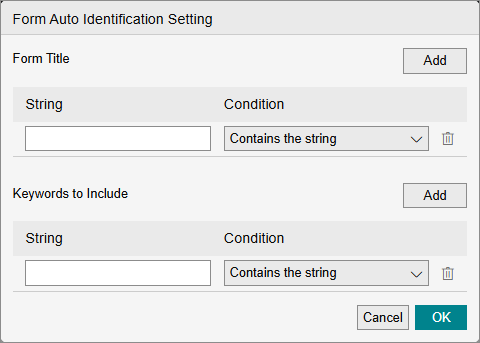
[Form Auto Identification Setting] Screen
This screen is displayed by clicking [Settings] in [Form Identification Method] on the [Form Type Setting] screen.
It enables you to configure the title and keyword to use for form identification.
- Regular expressions enable you to express multiple strings using a single string.
- The title and keywords configured here are used to identify a form in the following order.
- The title in [Form Title] is compared with strings at the top of the form that have a text size larger than other strings. The entire form is searched from top to bottom, and the form is deemed to match if the string is found.
- If the form cannot be identified in step 1, the entire form is searched for the keywords in [Keywords to Include]. If two or more keywords are found, the form is deemed to match.
[Form Title]
- [Add]
Click this to add the [String] and [Condition] lines. You can add up to 50 lines. - [String]
Enables you to enter an arbitrary string of up to 200 characters. - [Condition]
Select [Contains the string] or [Matches the regular expression]. - [
 ]
]
Click this to delete a line.
- If you selected [Matches the regular expression], meta characters (*.+?|{}()[]^$-\) used in the regular expression cannot be used in the title.
If you select [Contains the string], meta characters used in the regular expression can be used in the same manner as other strings. - For Japanese, Korean, and Traditional Chinese, specify a string that does not include any spaces in [Form Title]. For English, Thai, or Vietnamese, spaces can be entered between words as required.
[Keywords to Include]
Enter up to 50 characters for the keyword in the text box displayed by clicking [Add]. You can click [Add] to add multiple keywords.
- [Add]
Click this to add the [String] and [Condition] lines. You can add up to 50 lines. - [String]
Enables you to enter a keyword of up to 200 characters. - [Condition]
Select [Contains the string] or [Matches the regular expression]. - []
Click this to delete a line.
- Two or more included keywords must be set.
- If you selected [Matches the regular expression], meta characters (*.+?|{}()[]^$-\) used in the regular expression cannot be used in the keywords.
If you select [Contains the string], meta characters used in the regular expression can be used in the same manner as other strings. - Specify a string that does not include any spaces in [Keywords to Include].
However, note that if spaces are included in the string included in the form, the string may not be extracted correctly.
[OK]
Saves the settings.
- If you selected [Matches the regular expression] for [Condition] in [Form Title] or [Keywords to Include], a syntax check is executed for the regular expression when you click [OK]. If a syntax error is found, a message is displayed.