[Default Value When Uploading Files] Screen
This screen is displayed by clicking [Default Value When Uploading Files] on the options screen.
It enables you to configure the default values when sending files.
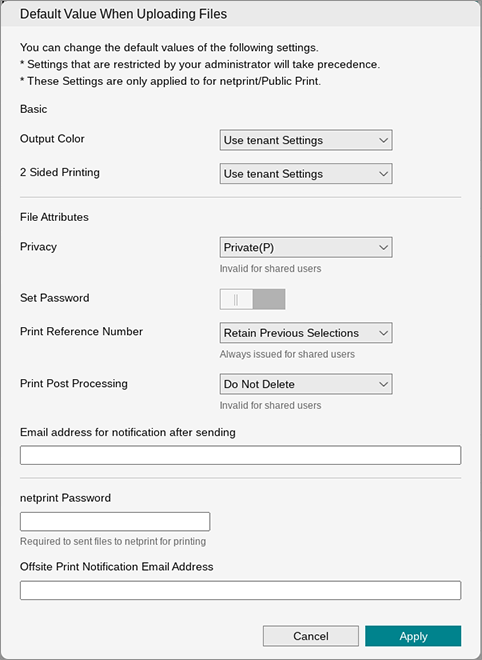
[Output Color]
Configures the default color mode to use. When [Tenant Value] is selected, the value set in the tenant is used.
[2 Sided Printing]
Configures the default number of sides to print on. When [Tenant Value] is selected, the value set in the tenant is used.
- When "2 Sided only" is set, "1 Sided" cannot be selected.
[Privacy]
Configures the disclosure range. It is invalid for shared users.
[Set Password]
Configures the passcode. When this is enabled, a password box for entering the passcode is displayed. If you enter a passcode, it is always used. If you do not enter a passcode, passcode entry is required each time.
[Print Reference Number]
Configure the print reference number. A print reference number is always issued for shared users.
[Print Post Processing]
Configures the process to perform after printing. When [Tenant Value] is selected, the value set in the tenant is used.
[Email address for notification after sending]
Enter the e-mail address to notify when sending is complete.
[netprint Password]
Enter the password corresponding to the netprint ID. The password is required when transferring files to netprint for printing.
[Offsite Print Notification Email Address]
Enter the notification e-mail address for netprint.
[Apply]
Applies the settings.