[CSV Upload] Screen
This screen is displayed by clicking [CSV Upload] on the [List of Registered Users] screen.
It enables you to import a user information file created in the CSV format to register user information to Device Management.
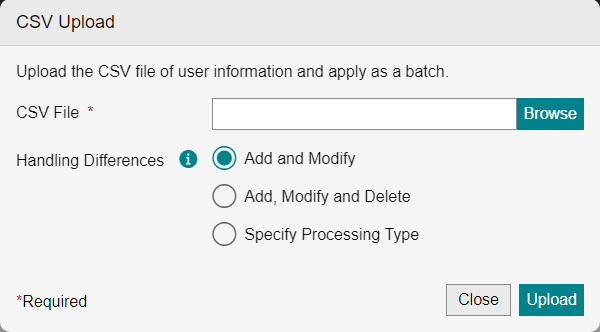
[CSV File]
Click [Select], and specify the CSV file to upload.
[Handling Differences]
Select how to add the user information included in the user information file to Device Management or how to update the existing information.
[Add and Modify]
Adds the user information included in the user information file or updates the existing information. Users are not deleted from Device Management. This prevents user data from being erased if an old file is accidentally uploaded. Normally select [Add and Modify].
[Add, Modify and Delete]
Overwrites the user information in Device Management with the user information included in the user information file. Users not in the file are deleted from Device Management. Select this item to restore a previous state such as backup data.
[Specify Processing Type]
Processes the user information included in the user information file according to the values of the [Processing Type] column in the file. This enables you to add, update, or delete information for each user. Unintended changes are prevented because an error occurs if there is a mismatch between the user registration status and processing type.
[Upload]
Uploads user information to Device Management.