[List of Registered Device] screen
This screen is displayed by clicking [List of Registered Device] in [Device Management] in the [Device Management] menu.
It displays a list of the devices managed by the system administrator.
- [Accounting Settings], [Authentication Settings], [Device Update Settings], [Device Status List], and [Printer MIB Device Management] are available if you have purchased (contracted) a FUJIFILM IWpro Device Management license.
- [Print Usage Settings] is available if you have purchased (contracted) a user license.
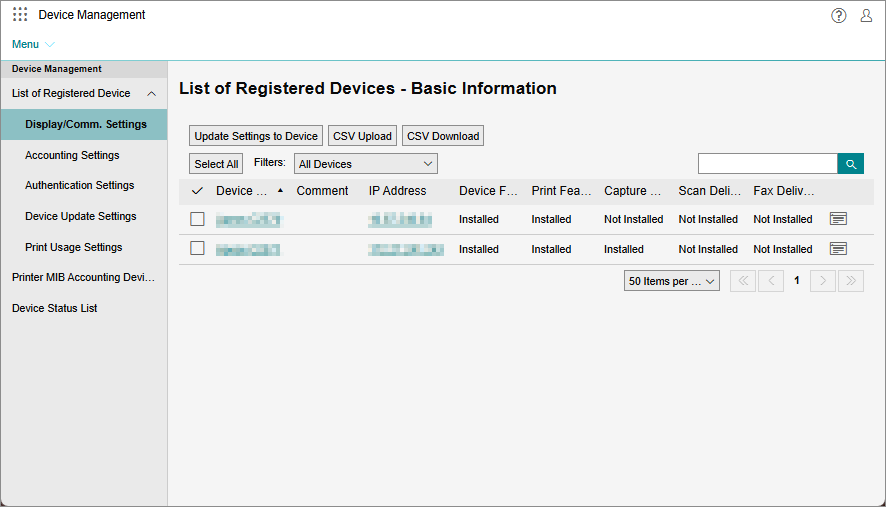
Side Menu
Enables you to configure the various device settings.
[Resume Update Reception for All Devices]
In the following cases, Device Management stops sending setting information to devices affected by the "setting group". This function resumes that process.
- If the "setting group" is changed in the device or user properties
- If the "setting group" is changed when changing devices and users with a CSV file
- This item is displayed if device updating has stopped for one or more devices due to a setting group change operation.
[Properties]
Displays the properties of the selected device.
If one device is selected, the [Properties] screen for the device is displayed.
[CSV Upload]
Displays a screen that enables you to use a file in the CSV format (a device information file) to register device information for multiple devices at a time.
[CSV Download]
Displays a screen for downloading a list of the devices registered to FUJIFILM IWpro in the CSV format. You can select the items to download.
[Update Settings to Device]
Enables you to reflect the user setting information, authentication settings, and device accounting settings (whether to enable daily counter accounting and the daily notification time) changed on the web page.
- The following conditions must be met.
- An SSL server certificate is installed to the device
- [HTTP SSL/TLS Communication] is set to [Enabled] in [Display/Comm. Settings]
- The values in [IP Address] and [HTTP Port Number] in [Display/Comm. Settings] match the values set in the device
[Filter]
Filters the devices displayed in the list.
If [Authentication Settings] is selected in the side menu, you can filter by setting group.
[ ]
]
Enables you to enter arbitrary text in the search box to search for devices to display in the list.
Device List
In addition to [Device Name], [Comment], and [IP Address], displays the following items according to the item selected in the side menu.
- When [Display/Comm. Settings] is clicked, the devices installed in the device are displayed, such as [Device Feature] and [Print Feature].
- When [Accounting Settings] is clicked, [Daily Notification] and [Closing Counter on Last Closing Data (ClosedData)] are displayed.
- When [Authentication Settings] is clicked, [Auth. Setting by] and [Setting Group] are displayed.
- When [Device Update Settings] is clicked, [Update Status] and [Daily Notification] are displayed.
- When [Print Usage Settings] is clicked, [reservedNumberPrint] and [colormodeRestraint] are displayed.
- The displayed items differ according to the country or region.
[ ]
]
Displays the [Properties] screen for the device.