Details/Solution Screen
This screen is displayed by clicking [Browse] on the process confirmation screen.
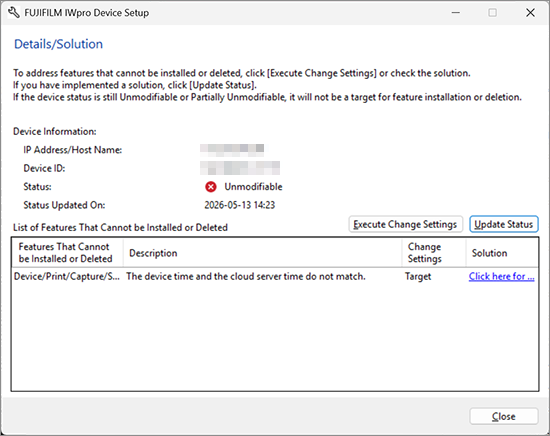
[Device Information]
Enables you to check the information and state of the device selected on the process confirmation screen.
[List of Features That Cannot be Installed or Deleted]
Displays the functions that cannot be installed or removed and the reason why.
If a configuration problem can be solved with this tool, [Target] is displayed for [Change Settings]. You can click [Execute Change Settings] to change the device settings and solve the problem.
Click [TroubleshootingLink] to display a solution for the problem.
[Execute Change Settings]
Click this to solve a configuration problem for an item with [Target] displayed for [Change Settings].
- This button is only displayed if there is an item with [Target] displayed for [Change Settings].
- A confirmation message may be displayed if administrator agreement is required, such as in cases where network settings will be changed.
[Update Status]
Refreshes the information in [List of Features That Cannot be Installed or Deleted].
- This button is only displayed if there is an item with [Target] displayed for [Change Settings].