Unregistering a Device (Using a Computer)
You can use FUJIFILM IWpro Device Setup to remove the FUJIFILM IWpro apps and plug-ins installed to a device. FUJIFILM IWpro will also be unregistered.
- Make sure to use FUJIFILM IWpro Device Setup or FUJIFILM IWpro Setup to unregister a device, instead of removing the device from the screen of FUJIFILM BI Direct.
If you remove a device without using FUJIFILM IWpro Device Setup or FUJIFILM IWpro Setup, it may not be unregistered correctly. - Do not perform other operations on the device until the procedure on this page is complete. Also note the following.
- Do not touch the control panel or power supply of the device.
- Do not access Internet Services. If you are logged in, log off and wait about 40 seconds before starting the procedure.
- Do not perform operations such as printing.
- Do not receive faxes.
- If you are using Smart WelcomEyes, do not approach the device. Also make sure to temporarily disable Smart WelcomEyes.
- Double-click "FUJIFILMIWproDeviceSetup.exe".
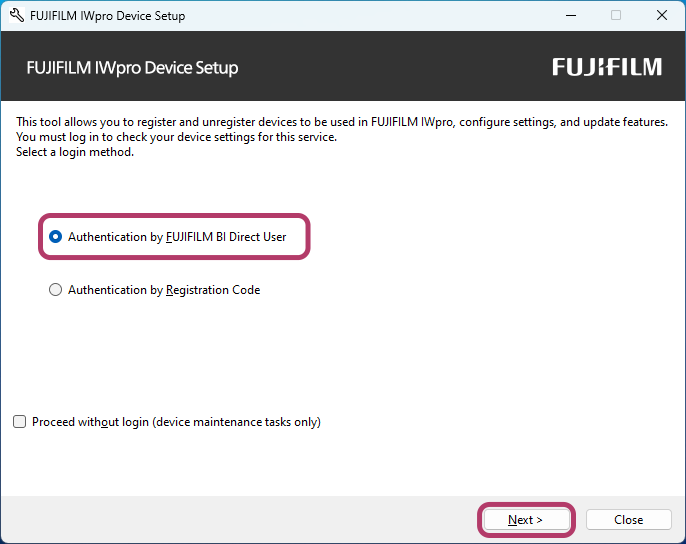
- Select [Authentication by FUJIFILM BI Direct User], then click [Next].
- Perform the following operations.
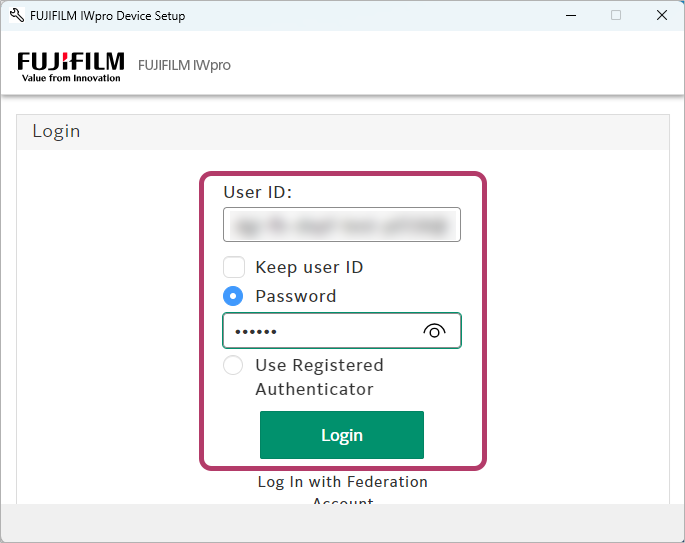 To log in as a FUJIFILM IWpro administrator
- Click [Continue].
- Log in using the user ID and password of a FUJIFILM IWpro administrator.
If you are already logged in as a FUJIFILM IWpro administrator- Click [Continue].
If you are logged in as a user other than a FUJIFILM IWpro administrator- Log out from FUJIFILM BI Direct.
- Click [Continue].
- Log in using the user ID and password of a FUJIFILM IWpro administrator.
- If you are logged in as a user other than a FUJIFILM IWpro administrator, an error message is displayed. Return to step 2.
- If you clicked [Cancel], return to step 2.
- [Authentication by Registration Code] is also available as a method for registering devices without using the user ID and password of an administrator.
Select [Authentication by Registration Code] in step 2 and log in by entering the registration code included in the e-mail sent when you made a contract for FUJIFILM IWpro. - There is an expiration date for the registration code.
- When logging in with a registration code, RSS notification cannot be configured for device usage status in the Device function.
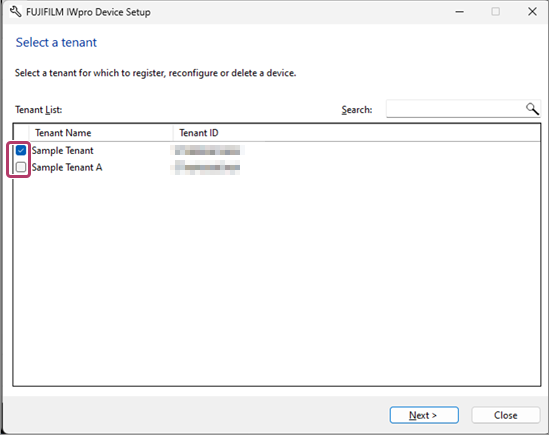
- Select the tenant of the device to configure, then click [Next].
- The tenant selection screen is only displayed when the user to log in with belongs to multiple tenants.
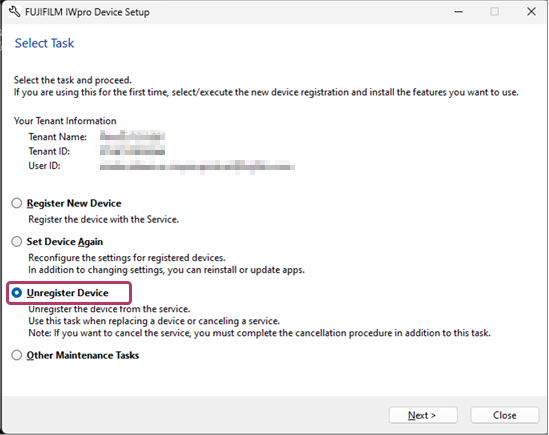
- Select [Unregister Device], then click [Next].
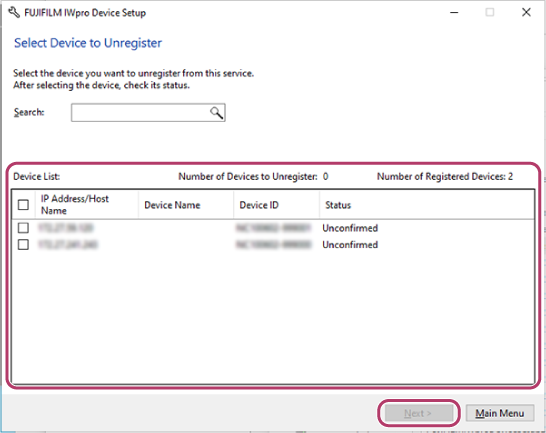
- On the device unregistration screen, select the device to unregister.
- Select the check box of the device to unregister.
- Enter the ID and password of the device system administrator, then click [OK].
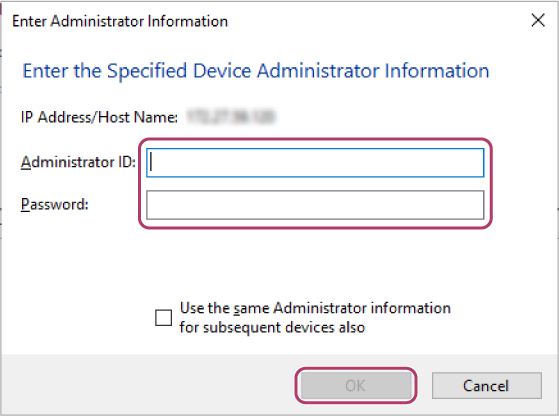
The check box of the selected device is selected in the device list.
- An error screen may be displayed if communication with the device is not possible because the device has already been removed or another reason, but you can still proceed to unregister the device.
If you do so, the information on the device itself will not be deleted, but the information saved to the FUJIFILM IWpro server will be.
- Select the check box of the device to unregister.
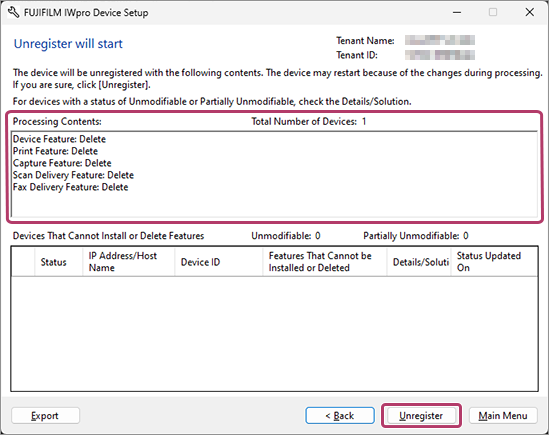
- On the process confirmation screen, confirm the process, then click [Unregister].
- If a device cannot be unregistered, it is displayed in [Devices That Cannot Install or Delete Features]. Click [Browse] for the [Details/Solution] field, and confirm the displayed information.
- Click [Close].FUJIFILM IWpro Device Setup closes.
- If [Close] is not displayed, click [Main Menu] to return to the menu screen.
- Log out from FUJIFILM BI Direct.