Determining the Device Setup Method
You can either perform device setup using FUJIFILM IWpro Device Setup on a Windows computer or using FUJIFILM IWpro Setup, which is displayed on the control panel of a device.
Both methods install the same FUJIFILM IWpro functions.
Select the setup method suitable for your environment.
|
|
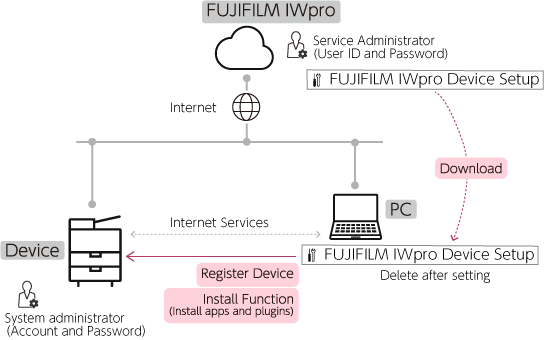
Registering Devices with FUJIFILM IWpro Device Setup (Using a Computer) |
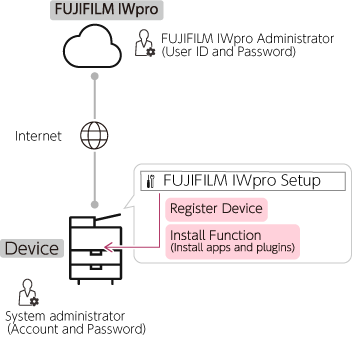
Registering Devices with FUJIFILM IWpro Setup (Using the Control Panel)
|
- Administrator privileges for a "FUJIFILM IWpro administrator" will be assigned to the customer that enters a contract.
- FUJIFILM IWpro Setup may be able to be displayed on some devices by performing a firmware update.
- An app icon may not be displayed when an app is added. In this case, log in as the system administrator, then press and hold the icons to add the app icon from the edit screen.
Overview of FUJIFILM IWpro and Devices
The devices to link with FUJIFILM IWpro are configured as follows.
Registering Devices with FUJIFILM IWpro Device Setup (Using a Computer)
Registering Devices with FUJIFILM IWpro Setup (Using the Control Panel)
| Term | Description |
|---|---|
| App | A function displayed as a button on the home screen of the control panel of a device. |
| Plug-in | A function that operates in a device. Does not have a screen that the user operates on the control panel. |
| Internet Services | A function used on the Web browser of a computer for checking the status of a device or configuring the settings of a device. |
Apps and Plug-ins Installed to a Device
When a function is registered to a device, the following apps and plug-ins are installed to the device.
| Function to Install | App | Plug-in |
|---|---|---|
| Device Function | Your Usage Data |
|
| Print Function | FUJIFILM IWpro Print |
|
| Capture Function | FUJIFILM IWpro Capture |
|
| Scan Delivery Function | FUJIFILM IWpro Scan Delivery |
|
| Fax Delivery Function | FUJIFILM IWpro Fax Delivery Switch Fax Operation |
|
Functions Configurable in a Device
The functions that are configurable for each license type are indicated below.
| Function | Description | FUJIFILM IWpro license | ||
|---|---|---|---|---|
| Standard/Light | Multifunction Device Management | |||
| Device Function | Enables the Device Management service of FUJIFILM IWpro to be used to collect job logs and check device usage history. | - | - | Yes |
| Print Function | Enables the print jobs of the FUJIFILM IWpro Print service to be printed on the device. | Yes | Yes | - |
| Capture function*1 | Enables you to create FUJIFILM IWpro rules to import documents scanned or received by fax on a device to a workspace or File Management, as well as send documents via fax. | Yes | Yes | - |
| Scan Delivery Function | Enables you to use a device app to configure work processes to send scanned documents to a cloud service or computer. | Yes | Yes | - |
| Fax Delivery Function | Enables you to use a device app to print documents received via fax, or save documents to a folder, transfer documents to a cloud service or computer, or sort documents. | Yes | Yes | - |
- The available functions differ according to the license you have a contract for.