2.1 Creating Custom Attribute Definitions
There are two types of attributes used in FUJIFILM IWpro File Management:
System Attributes
System attributes are attributes that are pre-configured in FUJIFILM IWpro File Management, such as “Created Date/Time”, “Created By”, and “Updated Date/Time”.
Custom Attributes
This is a user definition attribute.
To use custom attributes, it is necessary to create custom attribute definitions beforehand in FUJIFILM IWpro File Management. In this section, you create the following custom attribute definitions:
| Custom Attribute Definition Name | Description |
|---|---|
| Case Number | Assing a number to manage the cases. |
| Case Name | Set a name of the case. |
| Case Status | Set the progress status of the case such as “Running” and “Complete”. |
| Business Partner Code | Set a number unique to each business partner. |
| Business Partner | Set a business partner. |
| Document Type | Specify the type of document you want to store, such as "Quotation" or "Order Form". |
| Quotation Date | Set the date when the quotation was created. |
| Quotation Number | Assign a number to manage the quotation. |
| Quotation Expiration Date | Set the expiration date of the quotation. |
| Quotation Total (excluding tax) | Set the amount of the quotation. |
| Order Date | Set the date when the order form was received. |
| Order Number | Assign a number to manage the order. |
| Order Total (excluding tax) | Set the amount of the item ordered. |
| Original Storage Location | Set the location where the original of the document is stored. |
1.
Click  in the upper left corner of the screen and click [File Management] in the Admin menu.
in the upper left corner of the screen and click [File Management] in the Admin menu.2.
From the menu, click [Custom Attribute Definition].
The [Custom Attribute Definition] screen appears.
3.
Click [Create New].
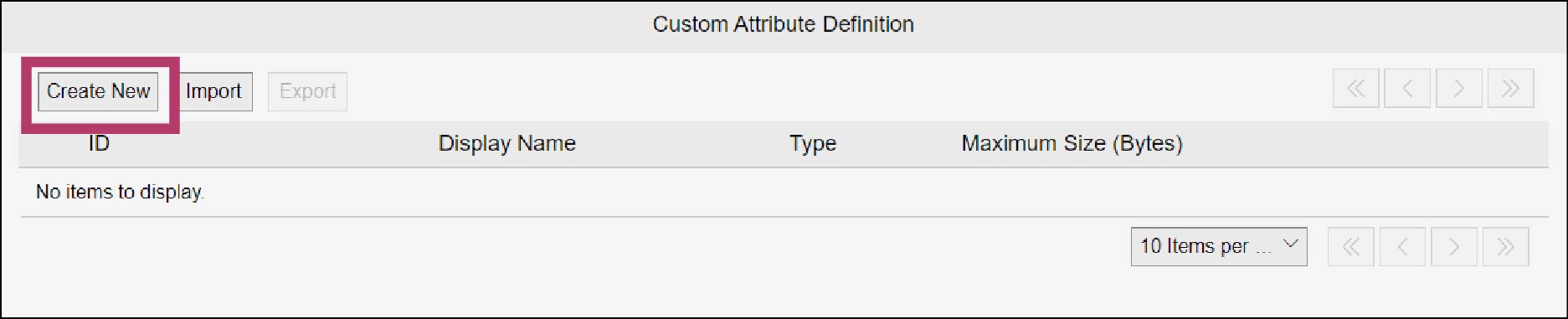
The [Create Custom Attribute Definition] screen appears.
4.
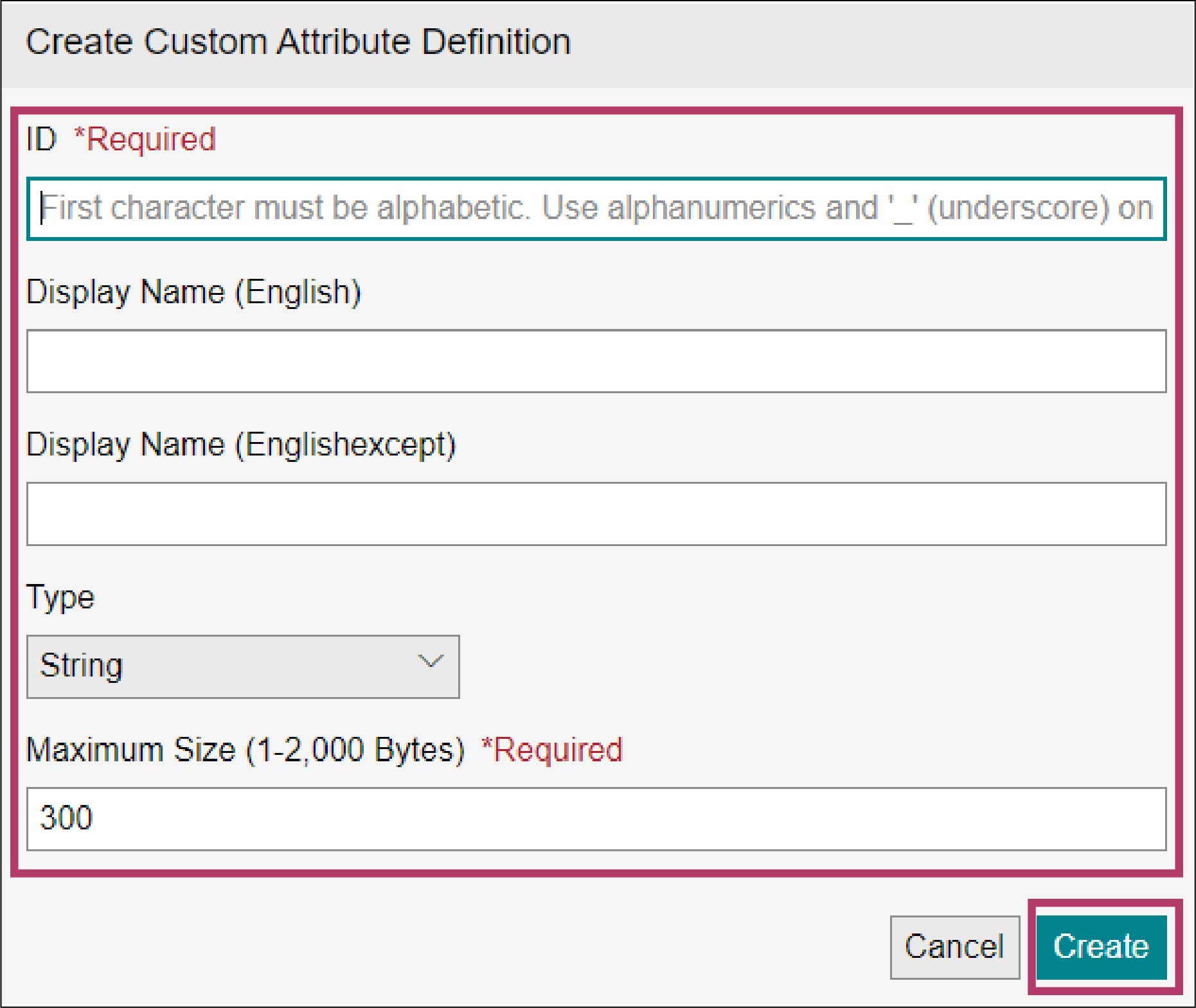
Enter the following and click [Create].
| ID | Display Name (English) | Data Type | Maximum Size |
|---|---|---|---|
| project_number | Case Number | String | 300 bytes |
Note
The language (“xxx”) in [Display Name (xxx)] is the language you have set in [Primary Language] of the Office Basic Information.
The custom attribute definition “Case Number” is created.
5.
Repeat steps 3 and 4 to set the following custom attributes.
| ID | Display Name (English) | Data Type | Maximum Size |
|---|---|---|---|
| project_name | Case Name | String | 300 bytes |
| project_status | Case Status | String | 300 bytes |
| account_code | Business Partner Code | String | 300 bytes |
| account_name | Business Partner | String | 300 bytes |
| document_type | Document Type | String | 300 bytes |
| quotation_date | Quotation Date | Date/Time | - |
| quotation_number | Quotation Number | String | 300 bytes |
| quotation_expiration_date | Quotation Expiration Date | Date/Time | - |
| quotation_amount_tax_exclusive | Quotation Total (excluding tax) | Integer | - |
| order_date | Order Date | Date/Time | |
| order_number | Order Number | String | 300 bytes |
| order_amount_tax_exclusive | Order Total (excluding tax) | Integer | - |
| original_storage_location | Original Storage Location | String | 300 bytes |
Note
The language (“xxx”) in [Display Name (xxx)] is the language you have set in [Primary Language] of the Office Basic Information.