[Import from MFD Add-on App] Screen
This screen is displayed by clicking [Import Document] > [Preferences] > [Import from MFD Add-on App] on the launcher screen of FUJIFILM IWpro.
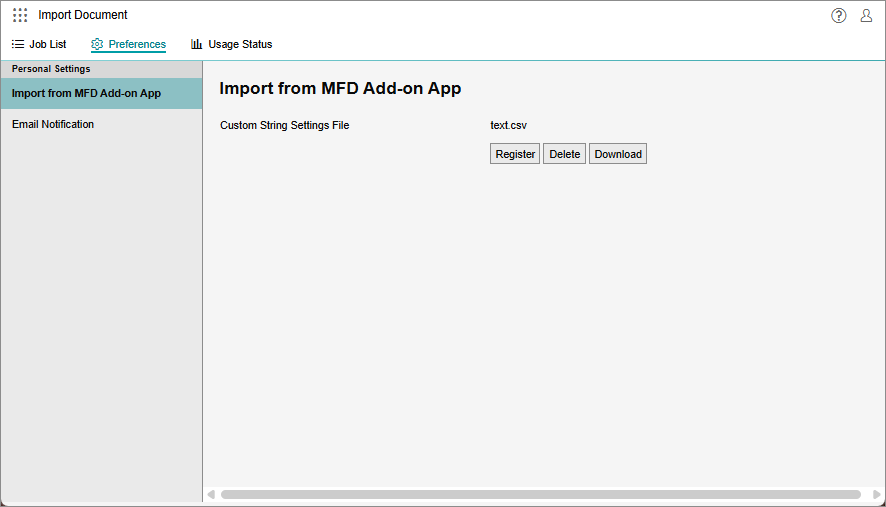
[Custom String Settings File]
If strings are registered in a CSV file or TSV file, the registered file names are displayed.
[Register]
Displays the [Custom String Settings File] screen.
[Delete]
Deletes the registered file.
[Download]
Downloads the registered strings as a CSV file.
[Custom String Settings File] Screen
This screen is displayed by clicking [Register] on the [Import from MFD Add-on App] screen.
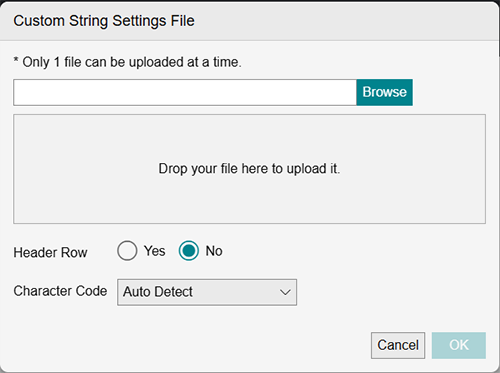
Select File
Click [Browse] to display the file selection screen.
Drop Area
Enables you to drag-and-drop files on a PC using Explorer, etc.
[Header Row]
If you select [Yes], the first row of the CSV file is not registered as a string. If you select [No], the first row is registered as a string.
[Character Code]
Select [Auto Detect], [UTF-8], [UTF-8 (with BOM)], or [Shift-JIS].