Start DocuWorks Tray 2 with one of the following methods.
DocuWorks Tray 2 is an optional software for DocuWorks.
To use it, you need to purchase a separate license and install it.
Note:Customers who have a contract for DocuWorks Subscription or DocuWorks Subscription Suite can use DocuWorks Tray 2 as a standard feature.
If a tray icon is displayed on your PC desktop, DocuWorks Tray 2 is running.
If you already have a tray icon on your desktop, proceed to the next step.
- Click the Start button on your PC > FUJIFILM DocuWorks Tray > [DocuWorks Tray]
- Click the Start button on your PC > Fuji Xerox > [DocuWorks Tray]
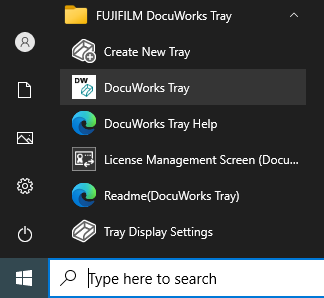
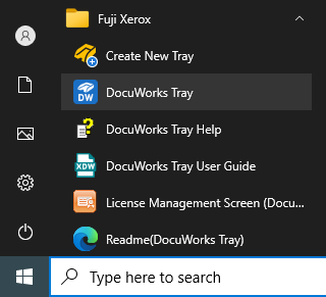
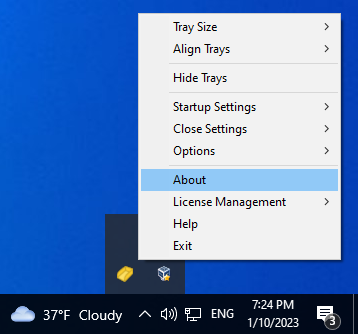
Check the DocuWorks Tray 2 version information from the [Show hidden icons] at the bottom right of the PC desktop.
- Click [Show hidden icons] on the taskbar of your PC
- Right-click the Tray Management icon > click [About]
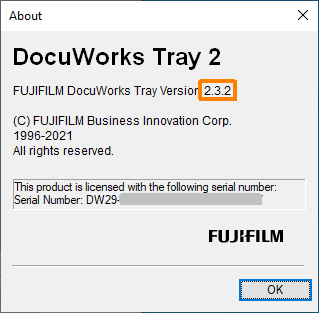
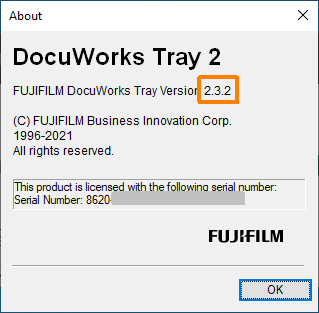
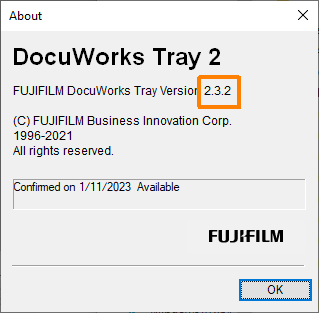
- Check the license type and version
The part surrounded by an orange frame is the detailed version. - Screen displayed when using the "Licensed Edition"
If the listed serial number starts with "DW29", you have an "Licensed Edition" installed. - Screen displayed when using the "Volume License Edition"
If the listed serial number starts with "8620", you have an "Volume License Edition" installed. - Screen displayed when using "Subscription" or "Subscription Suite"
If the availability confirmation date is displayed, "Subscription" or "Subscription Suite" is installed.